2D Animation

Author name: wpdev

ChatGPT Image May 22 2026 02 25 01 AM 2D Animation Studio
Blog

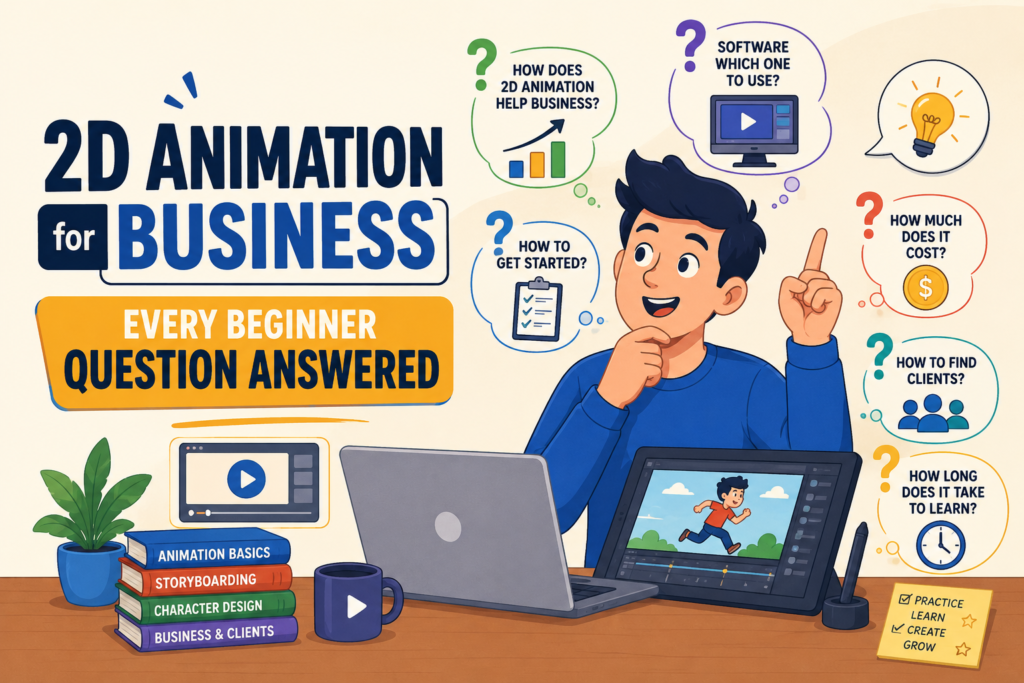
2D Animation for Business: Every Beginner Question Answered

Every business owner commissioning 2D animation for the first time arrives with the same cluster of questions. Some of them feel too basic to ask a studio directly. Others feel like they should already know the answer. Most of them are entirely reasonable, and every experienced animation studio has heard all of them. This FAQ collects every significant question a business owner might have about commissioning 2D animation — organized into categories, answered directly, and written without jargon. If you are brand new to animation for business, start at the beginning. If you have a specific concern, skip to the relevant category. Either way, by the end of this article you will have everything you need to approach an animation studio with confidence. There is no such thing as a question too basic to ask before commissioning animation. The questions you skip before the project starts become the problems you deal with during it. Category 1: Understanding 2D Animation (What It Is and How It Works) What exactly is 2D animation, and how is it different from 3D animation? 2D animation is the creation of motion in a flat, two-dimensional plane — characters, shapes, text, and graphic elements that move along horizontal and vertical axes without depth or three-dimensional volume. It is the oldest form of animation, rooted in hand-drawn cel animation, and it has evolved into a digital medium produced using software like Toon Boom Harmony, Adobe Animate, and After Effects. 3D animation creates objects and environments with full three-dimensional volume, depth, and shadow — the visual language of Pixar films and video game cutscenes. For most business communication needs, 2D animation is the more practical and cost-effective choice: it is faster to produce, more affordable, and better suited to abstract concepts, process visualization, and character-driven storytelling. What kinds of 2D animation can a business use? The most common types of 2D animation for business use are: explainer videos (60 to 120-second animated videos that communicate what a product or service is and why it matters), motion graphics (animated abstract shapes, typography, and data visualizations without characters), logo animations (motion sequences in which a brand’s logo reveals, assembles, or transforms), social media animation (short animated posts, stories, and ads designed for social platforms), whiteboard animation (hand-drawn style animation on a white background used for educational content), character animation (custom-drawn character-driven storytelling for brand films and marketing content), and animated infographics (motion versions of data visualization and informational graphics). Most animation studios that specialize in 2D work can produce all of these formats. Is 2D animation suitable for a B2B brand, or is it only for consumer companies? 2D animation is widely used in B2B contexts and is in many respects better suited to B2B communication challenges than live-action video. The core B2B communication challenge — explaining complex, abstract, or technical products and services to buyers who need to understand before they can decide — is precisely what 2D animation excels at. Motion graphics and flat-design explainer videos are the standard format for SaaS, enterprise software, financial services, logistics, and professional services brands. The animation style and tone should be calibrated to the B2B audience — polished, credible, information-dense, and not cartoonish or overly playful — but the format itself is entirely appropriate and widely expected in B2B marketing contexts. Category 2: Cost and Investment (Budget and Pricing) How much does 2D animation cost for a small business? For a small business commissioning its first 2D animation, realistic budget expectations in the US market are: a simple motion graphics explainer video at $2,500 to $6,000; a standard flat design explainer video with basic character work at $5,000 to $12,000; a custom illustrated character animation at $10,000 to $25,000; and a logo animation at $500 to $3,000. These ranges reflect professionally produced work from studios with genuine creative expertise. Budget options well below these ranges typically involve template-based tools, stock character libraries, or offshore production — all of which carry meaningful quality and brand consistency trade-offs. For a first animation investment, a professionally produced explainer video in the $5,000 to $10,000 range typically represents the best balance of quality, impact, and budget efficiency. What is included in a typical animation production quote? A comprehensive animation production quote should include: script development, storyboarding, visual style design and asset creation, animation, voiceover casting and recording, music licensing and sound design, a defined number of revision rounds at each stage, final rendering, and delivery of finished files in specified formats. Quotes that do not include script development, voiceover, or sound design may appear more affordable but will incur these costs separately — sometimes at higher rates than if included in the original scope. Always ask for a full scope breakdown rather than comparing total prices, and confirm which file formats are included in the delivery package before signing. Can I get a good animation on a tight budget? Yes — with the right expectations and the right approach. The most effective way to get good animation on a limited budget is to simplify the scope rather than compromise on the quality of what is produced. A 45-second motion graphics explainer with strong art direction and excellent timing is a better investment than a 90-second illustrated character animation that is rushed due to budget pressure. Shorter duration, simpler visual style, a single scene environment rather than multiple environments, and a focused script with a single clear message are all scope choices that reduce cost without necessarily reducing effectiveness. A good studio will help you identify the highest-impact scope for your available budget rather than simply scaling everything down proportionally. Category 3: The Production Process (How It Works, Step by Step) What is the production process for a 2D animation? A standard 2D animation production moves through six sequential phases. Discovery and strategy: the studio reviews your brief, asks clarifying questions, and aligns on the project’s goal, audience, tone, and scope. Scriptwriting: the creative team develops the narration and visual direction for the video, which
ChatGPT Image May 13 2026 02 22 47 AM 2D Animation Studio
Blog

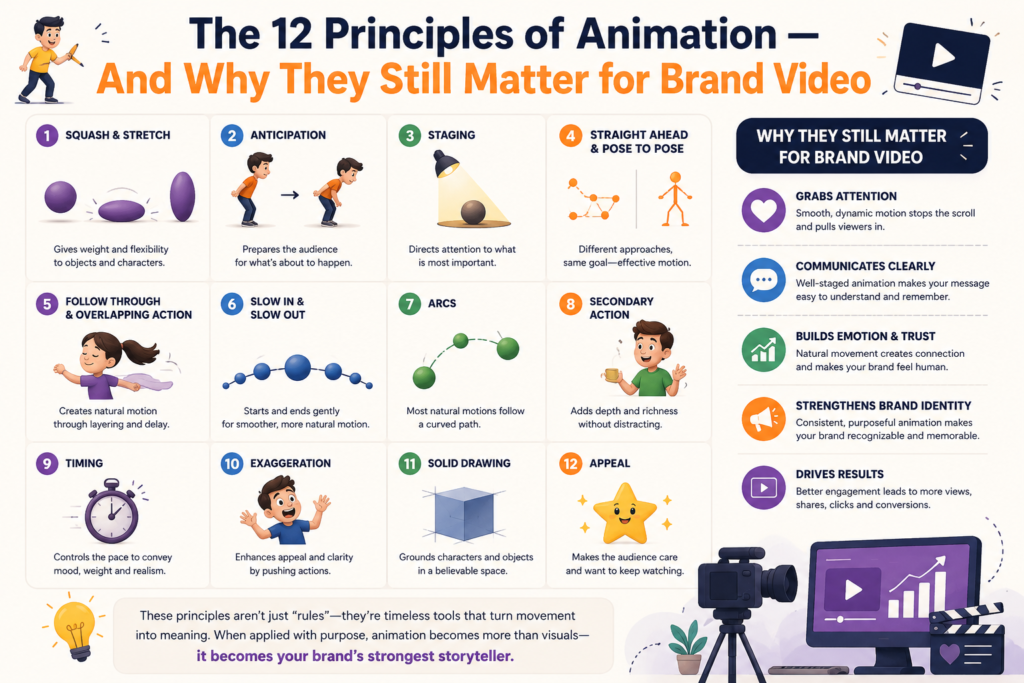
The 12 Principles of Animation — And Why They Still Matter for Brand Video

In 1981, two Disney animators named Ollie Johnston and Frank Thomas published a book called The Illusion of Life: Disney Animation. Inside it, they documented twelve principles that they and their colleagues had developed — largely through trial, error, and accumulated wisdom — over five decades of producing the most technically sophisticated and emotionally compelling animation the world had seen. Those twelve principles were not rules invented in a boardroom. They were observations about how human perception works — about why certain kinds of motion feel real, weight-bearing, and alive, and why other kinds feel mechanical, weightless, and dead. They described the conditions under which a drawn image creates the convincing illusion of a living, breathing, physically present being. Ninety years after they were first developed, in a world of digital drawing tablets, rigged character rigs, and AI-assisted animation tools, all twelve principles remain not just relevant but foundational. Every frame of every 2D animation your brand will ever publish is governed by them — whether the animator who produced it knows their names or not. Understanding them will help you evaluate animation quality, give better creative feedback, and make more informed decisions when choosing an animation partner. The 12 principles are not Disney’s rules. They are descriptions of how human perception responds to motion — and perception has not changed since 1935. Where the Principles Come From Walt Disney’s animation studio in the 1930s was doing something that had never been attempted before: producing feature-length animated films with characters whose emotional lives were rich enough to sustain a full narrative. To achieve this, the animators had to solve a fundamental problem — how do you make a drawing feel real? The answer they developed, piece by piece, is the twelve principles. They were not published in a training manual during the production years — they were implicit in the way the studio’s master animators worked, visible in the feedback they gave, and passed down through observation and apprenticeship. Johnston and Thomas spent years interviewing their colleagues, studying their own work, and articulating the principles explicitly for the first time in their book. Since publication, the principles have become the foundational technical and aesthetic framework of 2D animation education and practice worldwide. Every professional animation training program teaches them. Every professional animator applies them. And every commercial 2D animation your brand will ever commission is evaluated against them — consciously by the animator, unconsciously by the viewer. All 12 Principles — Explained for Brand Owners 1. Squash and Stretch Objects deform as they move, compressing in the direction of force and elongating in the direction of motion. A bouncing ball flattens when it hits the ground and stretches as it rises. This principle communicates weight and elasticity. Without squash and stretch, objects appear rigid and weightless — they move, but they do not feel like they have physical mass. With it, even a simple geometric shape convinces the viewer that gravity is acting on it. In brand animation: Used whenever a character or brand element needs to feel physical and real. A button that squashes when pressed feels interactive. A character who stretches toward an exciting discovery feels genuinely animated by emotion. The degree of squash and stretch is calibrated to the desired effect — subtle for realistic characters, exaggerated for comedic or high-energy animation. 2. Anticipation A movement is preceded by a preparatory motion in the opposite direction. A character bends their knees before jumping. A fist pulls back before swinging. Anticipation does two things simultaneously: it prepares the viewer’s eye for what is about to happen, and it makes the subsequent action feel more powerful. Without anticipation, motion feels abrupt and mechanical. With it, motion feels intentional and physically grounded. In brand animation: Used to prepare the viewer for significant visual events — a character about to deliver the key message, a graphic element about to appear, a scene about to transition. In brand animation, subtle anticipation signals communicate emphasis without requiring the viewer to consciously notice the preparation. 3. Staging The composition of each frame is arranged to direct the viewer’s attention to the most important element at each moment in time. Staging is the animation equivalent of the director’s shot choice in live film. Every visual decision — where characters stand, what is in the foreground versus background, what moves versus what stays still — is made to ensure the viewer’s eye lands on the right thing at the right moment. In brand animation: This is the principle most directly relevant to commercial effectiveness. A brand animation in which the CTA appears on screen but is not staged as the visual focal point of the final frames will convert less efficiently than one where the staging actively directs the viewer’s attention to the action prompt. Every frame of a commercial animation should be asked: where should the viewer be looking right now, and is this composition directing them there? 4. Straight Ahead and Pose to Pose Two different approaches to planning animated motion. Straight ahead means drawing each frame in sequence as the action unfolds. Pose to pose means planning the key positions first, then filling in the frames between them. These are production techniques as much as aesthetic principles, but their effect on the final animation is visible. Straight-ahead animation produces more spontaneous, fluid, and unpredictable motion. Pose-to-pose animation produces more controlled, precise, and consistent motion. In brand animation: Most commercial 2D animation uses a hybrid approach — pose-to-pose for structural clarity and consistency, with straight-ahead passes for expressive moments that need organic energy. Understanding this distinction helps clients recognize why spontaneous-feeling motion in a high-quality animation is a deliberate craft choice, not an accident. 5. Follow Through and Overlapping Action When a primary motion stops, secondary elements — hair, clothing, loose objects — continue moving momentarily before catching up. Different parts of a body start and stop moving at different times. This principle is what makes animated characters feel like they occupy physical

ChatGPT Image May 8 2026 02 34 41 AM 2D Animation Studio
Blog

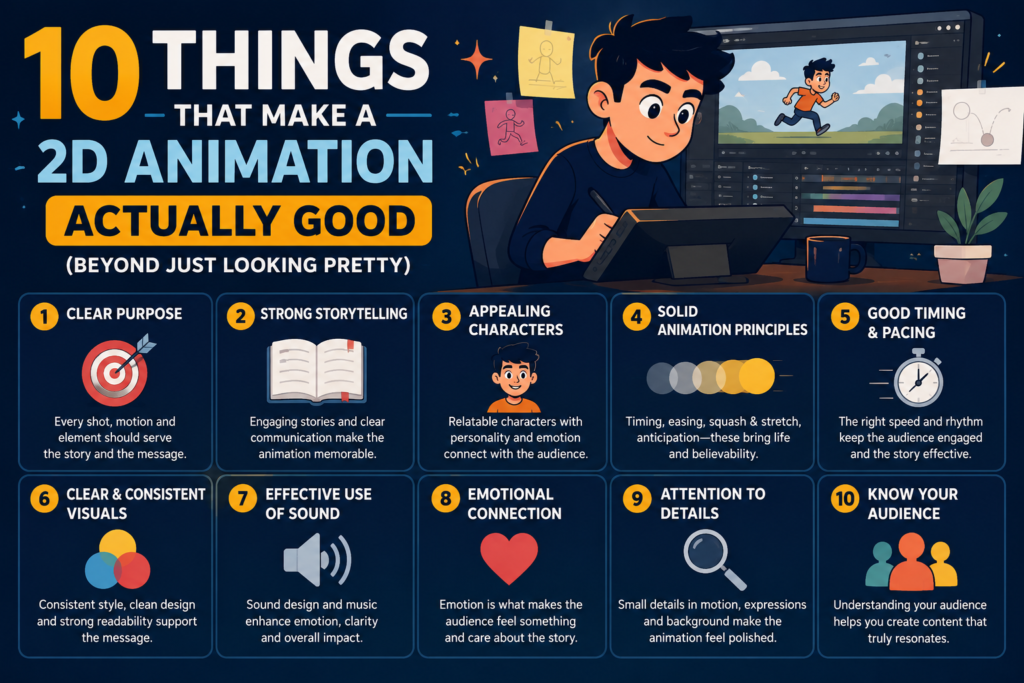
10 Things That Make a 2D Animation Actually Good (Beyond Just Looking Pretty)

Every element of a 2D animation — characters, environments, icons, typography, color — should feel as though it belongs to the same designed world. The color palette should be consistent throughout. The illustration style should not shift between scenes. The typography should follow the same system in every frame. The motion style — easing, timing, transition approach — should feel uniform rather than improvised. Visual inconsistency is one of the clearest signals of a studio working without adequate art direction, or a project that was produced under time pressure that compromised the design review process. Inconsistency breaks the viewer’s immersion in the content and creates a subliminal impression of a brand that does not have its act together. For brands investing in animation to build credibility, visual inconsistency in the animation is directly counterproductive. 5. Secondary Animation That Adds Depth Secondary animation refers to the supporting movement of elements that are not the primary focus of the scene: the slight sway of a character’s hair as they turn their head, the bounce of objects when they settle, the subtle idle breathing motion of a character waiting to speak. These elements are invisible when they are done well — they simply make the animation feel alive rather than mechanical. They are glaringly absent when they are not included. Secondary animation is one of the most reliable signals of production quality and animator skill, because it requires an understanding of how real physical systems behave and the ability to translate that understanding into deliberate motion decisions. Template-based and low-budget animation productions consistently omit secondary animation because it is time-consuming and requires craft that automated tools cannot replicate. Its presence in an animation reliably indicates a studio with experienced animators who care about quality beyond the primary motion. 6. Sound Design That Completes the Picture An animation viewed without sound is like a room with no furniture: the space is there, but it does not feel inhabited. Sound design — the combination of music, voiceover, and sound effects — does not simply accompany a 2D animation. It determines the emotional experience of watching it. The music bed sets the emotional register of the entire piece and primes the viewer’s emotional state before a word is spoken. Sound effects anchor specific visual moments — the click of a button, the arrival of a character on screen, the transition between scenes — and create a sense of physical reality in an otherwise flat visual world. The voiceover, when present, is the primary vehicle of meaning and must match the tone, pace, and personality of the brand with precision. An animation with poor sound design — generic stock music at the wrong tempo, voiceover that sounds recorded in a bathroom, sound effects applied arbitrarily — undermines visual quality that may have been excellent. 7. Deliberate Use of Color Color in 2D animation is not just aesthetic — it is communicative. The color palette of an animation determines its emotional temperature, its brand alignment, and its visual hierarchy. Warm colors advance and attract attention. Cool colors recede and suggest calm or professionalism. High saturation creates energy; low saturation suggests refinement. The relationship between colors — their contrast, their proportions, their dominant and accent roles — determines whether a composition feels balanced or chaotic, premium or generic. Good 2D animation uses color with intention: the most important element in any frame is given the highest color contrast or the most saturated tone to draw the eye. The color palette is consistent with the brand’s existing visual identity so the animation feels like a native brand expression. Accent colors are used sparingly enough that they retain emphasis value. And the palette is restrained enough — typically three to five primary colors — to create coherence rather than visual noise. 8. Clear Visual Hierarchy in Every Frame A well-composed animation frame communicates a clear visual hierarchy: the viewer’s eye lands on the most important element first, then moves to supporting elements in a logical sequence, then exits the frame having absorbed the intended information. This hierarchy is created through a combination of size, color contrast, placement, and motion — the elements that are largest, brightest, most centrally placed, or moving attract attention first. Poorly composed animation frames distribute visual attention democratically, treating all elements as equally important. The result is frames where the viewer does not know where to look, information is absorbed in random order, and the communication becomes muddled even if every individual element is well-designed. Composition discipline — ensuring that every frame has a clear visual anchor and a logical reading path — is one of the most transferable skills from graphic design to animation, and one of the most commonly neglected in lower-quality productions. 9. Transitions That Feel Designed, Not Default The way an animation moves between scenes is a design decision, not a technical default. A cut, a fade, a wipe, a push, a morph, a graphic match — each transition type carries a distinct emotional quality and a different level of visual disruption. Cuts are energetic and decisive. Fades are contemplative and connecting. Morphs are magical and suggest transformation. Graphic matches create visual wit and intellectual satisfaction. Good 2D animation uses transitions that are appropriate to the narrative and emotional context of each scene change. The transition from a problem scene to a solution scene should feel like a pivoting — a shift in energy that the transition style reinforces. The transition between two scenes of the same emotional register can be softer and less emphatic. Template-based animations use the same default transition throughout, which flattens the emotional texture of the piece and makes every scene change feel identical regardless of its narrative significance. 10. A Call to Action That Is Visually Earned The call to action at the end of an animation is the most commercially important single moment in the piece, and it should be designed accordingly. A good CTA arrives after the viewer has been given sufficient reason to act

47tPL tUblYSdUp0XTW DgjNJZENfoESGFzwDygIigD 3Cpb GBT m4HlrCOqmy4XOBAoeZXzF54cqkf975LmLsKzVVLnL XLlR88781kWkhCEbHBgRmIlsmpnj4lnz6PSEIyP3zmTUXIa6guPUj HoQ dUQ9lfPD35ZJkeMFXcif2 o5c g4MsFQ2IXBXk 2D Animation Studio
Blog

Flat Design vs. Illustrated 2D Animation: A Style Decision Guide for Brands

Of all the decisions you will make in a 2D animation project, the choice between flat design and illustrated animation is the one with the most visible consequences. It affects how your brand looks in motion for the life of the asset, how much the production costs, how long it takes to make, and — most significantly — how your audience feels when they watch it. These two styles are not simply different aesthetics. They communicate different things about your brand. They work better for different audiences. They carry different emotional registers. And they involve meaningfully different production processes, timelines, and investment levels. This guide works through every relevant dimension of the comparison so you can make an informed decision before you brief your animation studio. Flat design tells people you are clear and professional. Illustrated animation tells people you are human and memorable. Both are valid — but only one is right for your specific context. Defining the Two Styles Let’s take a look at the two major styles of 2D animation we can create today. What Is Flat Design Animation? Flat design animation uses geometric shapes, solid color fills, minimal detail, and a visual language that prioritizes clarity over expressiveness. Characters — when they appear — are simplified representations of human forms: circles for heads, rectangles for bodies, basic geometric limbs. The overall visual impression is clean, modern, and systematic. The term ‘flat’ refers to the absence of depth cues — no shadows, no gradients, no three-dimensional effects — that characterized the skeuomorphic design aesthetics that preceded it. Flat design in animation produces a visual world that feels designed, controlled, and brand-consistent, which is why it became the dominant style for commercial 2D animation through the 2010s and remains widely used today. What Is Illustrated Animation? Illustrated animation uses custom-drawn artwork with organic, expressive forms — characters with individual personality, environments with texture and depth, visual elements with hand-crafted quality that communicates artistic intention. The illustration style can range from bold and graphic to delicate and detailed, from whimsical and warm to precise and technical, but the defining characteristic in all cases is the presence of a distinct illustrative hand: a visual voice that is specific to the brand rather than derived from a generic geometric system. Illustrated animation requires more pre-production work than flat design because every character, environment, and prop must be individually designed to a finished illustration standard before the animation phase begins. The result is a visual world that is inherently more distinctive and harder to replicate than a flat design system. The Visual Differences in Practice While both are types of 2D animation, there are subtle visual differences that a sharp, practiced eye can use to discern between them. Let’s explore them in detail below. Characters and Figures In flat design animation, human characters are constructed from geometric primitives — circles, rectangles, and simple curves assembled into schematic figures. They can be animated efficiently and consistently, but they have limited expressive range: their faces can convey basic emotions through simple line shapes, but nuanced emotional acting is not achievable within the geometric constraint. Illustrated characters are drawn as complete, individual figures with organic proportions, expressive facial structures, and body language capable of subtle communication. A well-illustrated character can convey curiosity, anxiety, relief, determination, and delight through posture and expression alone — without a word of dialogue. This emotional expressiveness is the primary reason brands choose illustrated animation when their content requires the audience to form an emotional connection with a character on screen. Environments and Backgrounds Flat design environments are architectural and systematic — buildings represented as geometric blocks, offices as collections of rectangular forms, outdoor spaces as arrangements of simple shapes and color fields. They establish context efficiently without demanding visual attention, which is useful when the focus should remain on the character or the information being communicated. Illustrated environments have texture, atmosphere, and visual richness that flat environments cannot achieve. A street scene in an illustrated animation feels like a place; in a flat animation, it reads as a location indicator. For brand films and storytelling-led content where the viewer’s emotional immersion matters, the environmental richness of illustrated animation contributes meaningfully to the overall effect. Brand Differentiation This is the most commercially significant visual difference between the two styles. Flat design, by definition, draws from a shared visual language — the same geometric system that hundreds of thousands of brands use. Even with distinctive color choices and strong art direction, flat design animation operates within a genre that audiences now recognize as ‘the way animation looks.’ This is not fatal to effective communication, but it means the work of brand differentiation must come from other elements: the quality of the script, the strength of the narrative, the sophistication of the motion design. Illustrated animation is inherently differentiated because it is inherently custom. A character designed specifically for your brand, in a style developed specifically for your visual identity, expressing a personality developed specifically for your audience, looks like nothing else in the market. This uniqueness is not just an aesthetic advantage — it is a brand equity advantage. Audiences remember illustrated characters far more reliably than geometric representations of people. Side-by-Side Comparison Factor Flat Design Animation Illustrated Animation Visual character Geometric shapes, solid colors, minimal detail Organic forms, texture, expressive line quality Character design Simplified, schematic human figures Custom-drawn, individually expressive characters Emotional register Professional, modern, informational Warm, human, empathetic, memorable Production timeline Faster — asset library is simpler to build Slower — character design and rigging adds significant time Cost Lower — fewer hours of illustration required Higher — custom character work is labor intensive Brand differentiation Lower — flat is now the aesthetic baseline Higher — custom illustration is inherently unique Content type fit Explainers, process, data, SaaS Brand films, storytelling, consumer, education Revision flexibility High — geometric assets are faster to modify Moderate — character changes require redrawing or re-rigging Platform performance Excellent across all digital formats

cDM1hmIu90oCH61cqVDKjzrbcHvXPA3kqa1XVjWWVZbxygDNMJJW9jbUeFsphDXITqYmyjb3G7Tn8oMaKgXweT 7SUzrjgyebXOwAYY5aQ CduhYtHpUlnehwryajHEhfCwd3oKz79Weo82WVclz Rn3uKxv4L4zk8lUlHi8vTxEhonDHHmCCDXDq6f IEpI 2D Animation Studio
Blog

The Anatomy of a Perfect 2D Animation Script

Ask any experienced animation director what separates the animated videos that convert from the ones that do not, and the answer is almost always the same: the script. Not the animation style. Not the illustration quality. Not the voiceover. The script. This is a claim that surprises most clients, who tend to think of the script as the part that just tells the animation what to say — a functional necessity rather than a strategic variable. In reality, the script is the architecture of the entire piece. Every scene, every visual beat, every second of screen time is a direct expression of decisions made in the script. A poorly structured script produces a poorly structured animation, regardless of how talented the animators are. A tightly crafted script makes every subsequent production phase easier, cheaper, and faster. This guide dissects the anatomy of a perfect 2D animation script — the structure, the word counts, the section-by-section function, the common mistakes, and the principles that experienced scriptwriters apply on every project. It is written for brand owners and marketing leads, not for screenwriters. The script is not the part of an animation project that comes before the real work. The script is where most of the real work happens. What Makes an Animation Script Different From Other Writing An animation script is not a piece of marketing copy. It is not a blog post. It is not a product description. It is a timed, structured, production document that must accomplish several things simultaneously: communicate a clear message, create an emotional arc, provide visual direction, and fit within a precise duration that is typically measured in seconds, not pages. Every word in an animation script has a cost — in screen time, in animation complexity, and in the viewer’s attention. A 60-second animation contains approximately 150 to 160 words of narration if read at a professional, unhurried voiceover pace (roughly 2.5 words per second). That is fewer words than most email newsletters. Every single one must earn its place. This constraint is not a limitation — it is a creative discipline that forces clarity. The process of writing a strong animation script is largely the process of eliminating everything that is not essential. Brands that struggle with their animation scripts almost always do so because they are trying to say too much. The best animation scripts communicate one thing, compellingly. The Six-Part Structure of a High-Performing Animation Script The most effective 2D animation scripts — particularly for explainer videos and brand films — follow a proven six-part structure. Each section has a specific function, a recommended word count, and a timing window. The table below maps the structure for a 60 to 70-second animation. Script Section Timing Word Count Function The Hook 0–10 sec ~25–30 words Opens with the problem, pain point, or disruptive question the viewer already feels. The Problem 10–20 sec ~25–30 words Deepens the pain. Makes the viewer feel understood before offering any solution. The Solution 20–35 sec ~35–40 words Introduces the brand/product as the answer. Clear, confident, jargon-free. The Mechanism 35–50 sec ~35–40 words Shows how it works — enough detail to build credibility, not so much it overwhelms. The Benefits 50–60 sec ~25–30 words Outcomes for the viewer, not features. What does their life look like after? The CTA 60–70 sec ~15–20 words One specific next action. Direct, low-friction, and visually prominent on screen. This structure is not a rigid formula — it is a framework. Different projects, different audiences, and different animation styles call for different emphases. But the underlying logic is sound: the viewer must feel understood before they will feel persuaded, and they must understand the mechanism before they will trust the outcome. Section-by-Section Breakdown Section 1: The Hook (0–10 seconds) The hook is the most important single sentence in the animation script. Viewers make the decision to continue watching or stop within the first three to five seconds. The hook must immediately signal that this video is relevant to them — that it understands their world, their problem, or their goal. The most effective hooks open with the problem the viewer is already experiencing, not with the company that is about to solve it. Viewers do not care about your brand at the ten-second mark. They care about themselves. A hook that leads with your company name or your founding story loses the viewer before the value proposition is even reached. Compare these two openers for an animated explainer about a project management SaaS: [Effective — leads with the viewer’s pain]  Managing a growing team is easy — until it suddenly isn’t. Missed deadlines, scattered updates, and the sinking feeling that something important has slipped through. [Ineffective — leads with the company]  Flowdesk is the leading project management platform for teams of 5 to 500. Founded in 2019, we help businesses streamline their workflow and boost productivity. The first hook creates identification and curiosity. The second is a corporate press release that gives the viewer no reason to keep watching. Section 2: The Problem (10–20 seconds) The problem section deepens the pain established in the hook. Its function is to make the viewer feel genuinely understood — to signal that this video was made specifically for someone in their situation. Done well, the problem section creates a moment of recognition: ‘Yes. That is exactly what it feels like.’ The problem section should name the consequences of the problem, not just the problem itself. Not just ‘you have too many emails’ but ‘you spend three hours a day in your inbox and still miss the ones that matter.’ Not just ‘managing projects is hard’ but ‘your team is duplicating work, your clients are frustrated, and you are the one fielding the calls at 9 PM.’ The emotional register here is empathy, not alarm. The viewer should feel seen, not lectured. The tone is ‘we understand what you are going through’ — not ‘your current approach is wrong.’ Section 3: The Solution (20–35 seconds) The

ChatGPT Image May 2 2026 04 52 34 AM 2D Animation Studio
Blog

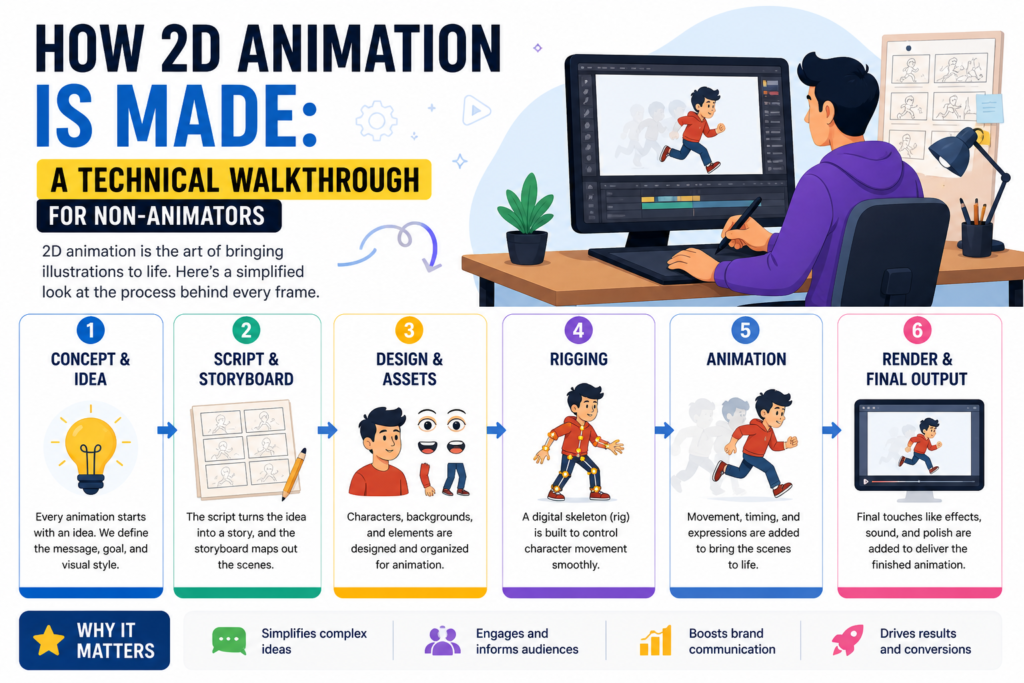
How 2D Animation Is Made: A Technical Walkthrough for Non-Animators

Most people who commission animation for their brand have never seen the inside of an animation production. They know what they want the final video to look and feel like — but the process that gets from a creative brief to a finished, rendered animation is largely invisible to them. That gap in understanding creates problems: unclear feedback, misaligned expectations, avoidable delays, and budget surprises. This walkthrough demystifies the 2D animation production process completely. It is written for business owners, marketing leads, and brand managers — not for animators. By the end, you will understand every phase of how a 2D animation is made, what happens in each one, what decisions you are responsible for as a client, and what to expect from your animation studio at each stage. Understanding how animation is made does not just satisfy curiosity — it makes you a significantly better client, which leads directly to better work and fewer revisions. The Six Phases of 2D Animation Production A professional 2D animation project moves through six sequential phases. Each phase builds on the last, and approval at each stage is required before the next begins. This linear structure is not arbitrary — it exists because changes become exponentially more expensive and time-consuming the further into production they occur. A script change costs one hour. The same change at the animation stage costs days. Phase 1: Discovery and Strategy Before any creative work begins, the production team needs to understand what the animation is for. This phase involves a kickoff conversation or brief review session in which the studio gathers the information needed to make strategic creative decisions: the goal of the video, the target audience, the key message, the tone, the distribution channels, and any existing brand assets the animation must align with. For experienced clients with clear briefs, this phase is short — a single meeting and a brief review. For clients who are new to animation or whose goals are not yet fully defined, the discovery phase may involve deeper strategic consultation to ensure the project is set up for success before any creative resources are committed. What you are responsible for in this phase: providing clear answers to the studio’s brief questions, sharing brand assets (logo files, brand guidelines, color palette, typography), and identifying the key stakeholders who will be involved in approval decisions throughout the project. Phase 2: Scriptwriting The script is the most important single document in any animation project. Every visual, every scene, every moment of the final animation is a direct expression of decisions made in the script. A weak or poorly structured script cannot be rescued by excellent animation — and a strong script makes every subsequent phase easier, faster, and cheaper. A professional animation script is not the same as a creative essay or a marketing copy document. It is a structured production blueprint that specifies exactly what is said (the voiceover or on-screen text), the emotional arc of the video, the pacing, and — in many studios — directorial notes about what should be visualized in each section. For a 60-second animation, the script is approximately 150 to 160 words of voiceover narration, plus production notes. The Script Approval Decision Script approval is the single most consequential decision a client makes in an animation project. Once the script is approved and the project advances to storyboard, changes to the script require corresponding changes to the storyboard and potentially to the recorded voiceover — creating a cascade of revisions that can add significant time and cost to the project. Invest the time in getting the script right before approving it. What to look for when reviewing a script: Does it lead with the viewer’s problem or need, not with your company’s story? Does it reach the core value proposition within the first 10 to 15 seconds? Is the language clear to someone who knows nothing about your product? Is there a single, specific call to action at the end? Is the tone consistent with your brand’s voice? Phase 3: Storyboarding Once the script is approved, the production moves into storyboarding — the visual planning phase in which each scene of the animation is sketched out as a sequence of rough frames. A storyboard functions like a comic book version of the final animation: it shows what will appear on screen in each section, how characters and graphic elements are positioned, how scenes transition, and how the visual narrative maps to the script. Storyboards are produced in rough sketch form — not finished illustration. Their purpose is to establish compositional decisions and narrative flow before any refined artwork is created. This is the correct phase at which to give feedback on visual direction, scene structure, and the overall flow of the animation. Reading a Storyboard Effectively When reviewing a storyboard, focus on structure rather than finish quality. Ask yourself: Does the sequence of scenes tell the story clearly? Are the transitions between scenes logical? Does the visual emphasis in each frame support the corresponding script line? Is there anything in the script that is not accounted for visually? Are there visual elements or scenes that feel unnecessary or redundant? What you should not focus on at the storyboard stage: the quality of the illustration, the colors, the character design, or the level of detail. All of that comes in the next phase. Giving detailed illustration feedback at the storyboard stage is one of the most common client mistakes in animation production, and it creates confusion about which feedback is actionable at which phase. Phase 4: Visual Design and Asset Creation With the storyboard approved, the animation team moves into the visual design phase — the stage at which the style of the animation is finalized and all of the artwork required for production is created. This is typically the phase that takes the most calendar time, because every background environment, character design, graphical element, icon, and typographic treatment must be illustrated to final quality before animation

ChatGPT Image May 2 2026 04 54 53 AM 2D Animation Studio
Blog

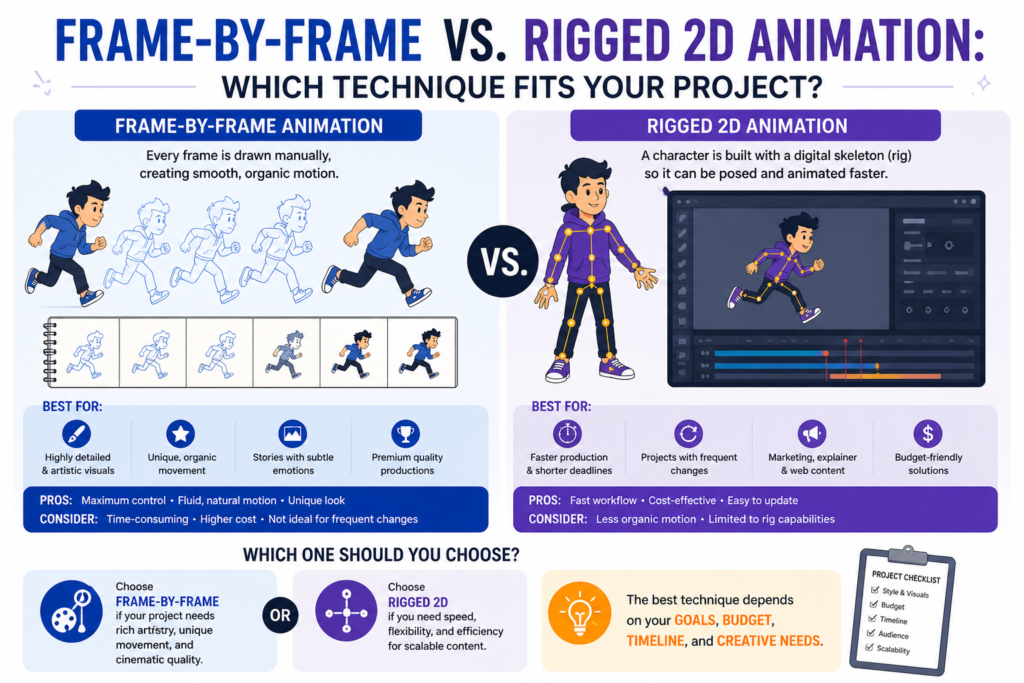
Frame-by-Frame vs. Rigged 2D Animation: Which Technique Fits Your Project?

When you commission a 2D animation, you are making dozens of decisions: style, duration, voiceover, music, platform. But one of the most consequential decisions — one that affects cost, timeline, visual quality, and long-term flexibility — often goes undiscussed entirely: the animation technique. There are two fundamental approaches to producing 2D animated characters and movement. Frame-by-frame animation, in which each individual frame is drawn from scratch, and rigged animation (also called cut-out or puppet animation), in which a set of pre-drawn character parts is assembled, connected, and posed using a digital skeletal system. Both techniques are capable of producing outstanding work. Both have significant trade-offs. And understanding the difference is the key to making a smarter brief — and getting a better result from your animation partner. The technique is not just a production detail. It shapes the look, the cost, the timeline, and the long-term value of your animated content investment. What Is Frame-by-Frame Animation? Frame-by-frame animation — also called traditional animation or hand-drawn animation in its digital form — is the technique in which every single frame of the animation is drawn as a unique image. At standard film and video rates, that means 24 individual drawings for every second of finished animation. A 90-second explainer video produced entirely in frame-by-frame technique requires a minimum of 2,160 individual drawings, each slightly different from the last to create the illusion of motion. In the pre-digital era, these drawings were made on paper and then transferred to celluloid. Today, the process is performed digitally using drawing tablets and software like Toon Boom Harmony, Adobe Animate, or TVPaint. The medium has changed; the fundamental process has not. The animator draws every frame. The Distinctive Visual Quality of Frame-by-Frame The reason studios and directors choose frame-by-frame animation despite its higher cost and longer timelines is the visual quality it produces. Because each frame is individually drawn, the motion has an organic, slightly imperfect quality — lines breathe, forms shift subtly, and the sense of hand-made craftsmanship is unmistakable. This quality communicates effort, artistry, and premium value in a way that rigged animation typically cannot replicate. Great frame-by-frame animation has weight, personality, and a particular kind of aliveness that audiences respond to viscerally. The fluid smear frames — frames that intentionally distort character forms to convey speed and energy — are impossible to achieve with a rigid rig. The textural richness of a fully hand-animated scene is unmatched in the 2D medium. The Real Costs and Trade-Offs Frame-by-frame animation is, without qualification, the most labor-intensive form of 2D production. The time required per second of finished animation is 5 to 10 times greater than for equivalent rigged animation. This translates directly into cost: a professionally produced frame-by-frame animated short can cost two to four times more than a rigged animation of the same length. Revisions are also significantly more complex. If a client requests a change to a character’s movement in frame-by-frame animation, the affected frames must be redrawn individually. In rigged animation, the same change might require adjusting a few keyframe poses. For commercial projects where client feedback and iteration are expected, this distinction has real budgetary consequences. What Is Rigged (Cut-Out) Animation? Rigged animation — sometimes called cut-out animation or puppet animation — takes a fundamentally different approach. Rather than drawing every frame from scratch, the animator begins by building a complete set of character assets: a head, a body, arms, legs, hands, and facial features, all drawn as separate illustrated pieces. These pieces are then assembled in animation software and connected using a digital skeleton — a hierarchy of joints that defines how each part of the body can move relative to the others. Animation is then created by posing the rig at key moments in time (keyframes) and letting the software interpolate the movement between poses. The animator adjusts timing, easing, and secondary movement to create the final motion. The character assets are drawn once and reused for the entire production — and potentially for future productions featuring the same character. Why Rigged Animation Dominates Commercial 2D Production The vast majority of commercial 2D animation produced today — explainer videos, animated ads, social media content, educational videos — uses rigged animation. The economic rationale is straightforward: it is faster, cheaper, and more scalable. A rigged character can be posed and repositioned in a fraction of the time required to draw equivalent motion frame by frame. Rigged animation also offers significant advantages for brand consistency. Once a character is designed and rigged, it maintains consistent proportions, features, and style across every scene and every future production. For brands that want to build an animated character system — a recurring cast of characters used across marketing, product, onboarding, and social content — rigged animation is the only practical approach. The Honest Limitations of Rigged Animation The trade-off for speed and scalability is expressiveness. A rigged character moves within the constraints of its rig — the number of joints, the range of motion designed into each limb, the pre-drawn expressions available for the face. For simple, clear motion — a character walking, gesturing, turning to face the camera — a well-built rig produces excellent results. For highly expressive, physically complex, or stylistically distinctive motion, rigged animation has ceiling limitations that frame-by-frame does not. Rigged animation can look mechanical when produced carelessly. The hallmark of poor rig work is motion that feels stiff and uniform — characters that slide rather than walk, arms that swing robotically rather than naturally. An experienced animator working with a well-built rig can largely overcome these limitations through careful timing, layered secondary motion, and strong anticipation and follow-through. But skill level matters enormously in rigged animation, perhaps more than in frame-by-frame, where the quality of the drawing itself carries much of the expressive weight. Side-by-Side: Frame-by-Frame vs. Rigged Animation The following comparison covers the most important production and strategic factors for brands choosing between techniques. Factor Frame-by-Frame Rigged / Cut-Out Production Speed Slow — every frame drawn

Gemini Generated Image 21u7u621u7u621u7 2D Animation Studio
Blog

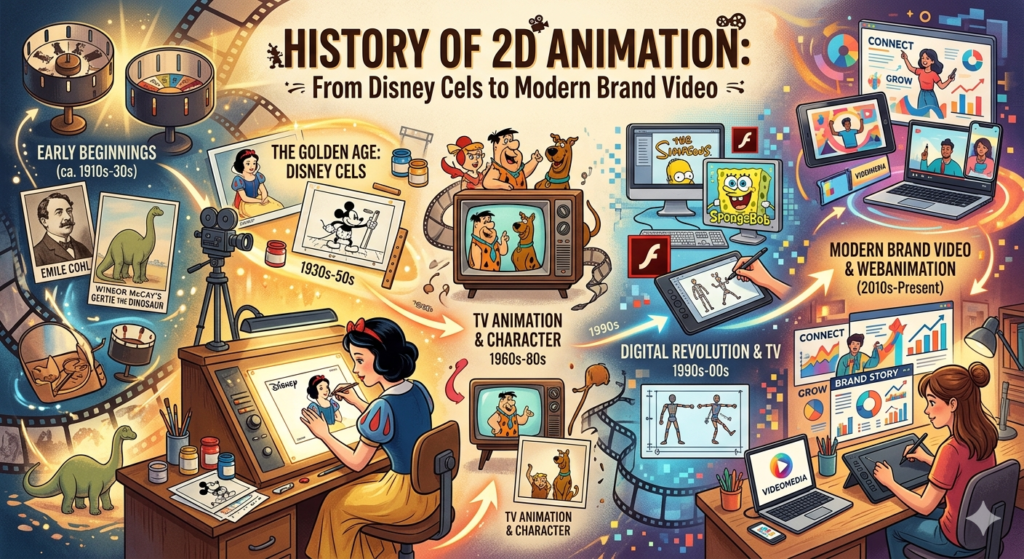
History of 2D Animation: From Disney Cels to Modern Brand Video

Every animated explainer video your brand publishes, every motion logo that opens your presentation, every illustrated character that guides a customer through your product — all of it traces its lineage to a room full of artists drawing on sheets of transparent celluloid nearly a century ago. Understanding the history of 2D animation is not just an exercise in nostalgia. It is the foundation for understanding why the medium works the way it does, why certain techniques carry specific emotional resonances, and how the evolution of tools has shaped what is now possible for brands investing in animated content. This deep-dive covers the full arc — from the birth of cel animation to the digital revolution to the motion-driven brand communication landscape of 2026. 2D animation has reinvented itself in every decade since its birth. Each reinvention expanded what was possible — and who could use it. The Origins: Pre-Cinema and the Persistence of Vision The conceptual foundation of animation predates film entirely. In the 1830s, optical toys like the zoetrope and phenakistoscope exploited a perceptual phenomenon called the persistence of vision — the brain’s tendency to perceive rapidly sequenced still images as continuous motion. These devices, which displayed a sequence of drawings on a spinning disc or cylinder, were the first time human beings experienced the illusion of drawn images moving. By the 1890s, film technology arrived, and with it came the first animated sequences. Emile Cohl’s 1908 short Fantasmagorie — a two-minute film composed of roughly 700 hand-drawn frames — is widely considered the first fully animated film. Each frame was drawn individually on paper, photographed, and played back to create the illusion of movement. The process was painstaking and the results primitive, but the medium had been born. The Cel Animation Breakthrough The invention that made 2D animation commercially viable was the celluloid sheet — a transparent film base on which characters could be drawn and then layered over painted background art. Developed around 1914 by Earl Hurd and John Bray, cel animation separated the character from the background for the first time, allowing animators to redraw only the moving elements in each frame rather than redrawing the entire scene. This reduced the labor required by an order of magnitude and opened the door to commercial animation production. Within a decade, animation studios had sprung up across New York and Los Angeles, producing short films for cinema. The process was labor-intensive by any modern standard — a single minute of animation required roughly 1,440 individual hand-drawn cels — but the business model worked. Cinema audiences were hungry for novelty, and animated shorts delivered it reliably. The Golden Age: Disney and the Twelve Principles The 1930s through the 1950s are generally regarded as the Golden Age of American animation. During this period, the Walt Disney Studios transformed 2D animation from a novelty into a refined art form with its own codified principles, production pipeline, and emotional vocabulary. Snow White and the Feature Film Revolution When Disney released Snow White and the Seven Dwarfs in 1937 — the first feature-length cel-animated film in history — it demonstrated that 2D animation could sustain narrative complexity, emotional depth, and visual beauty at the scale of live-action cinema. The production employed hundreds of animators working on a system of hierarchical specialization: lead animators designed character movement, assistants cleaned up the drawings, and ink-and-paint departments transferred the images to cel. It was the first fully industrialized animation pipeline. The Twelve Principles of Animation From the intensive production demands of Disney’s Golden Age emerged a set of principles that remain the foundational technical and aesthetic framework of 2D animation to this day. Developed by animators Ollie Johnston and Frank Thomas and later documented in their 1981 book The Illusion of Life, the twelve principles codified what makes animated motion feel believable and emotionally resonant: These principles did not originate for commercial brand video — but they govern it. Modern brand animators apply all twelve, whether consciously or not, every time they produce a piece of motion content. Television, Commercial Animation, and the Rise of the Limited Style The post-war period brought 2D animation to a new medium: broadcast television. Studios including Hanna-Barbera and Jay Ward Productions pioneered a deliberately simplified animation approach — known as limited animation — that reduced the number of frames per second and reused character poses aggressively to meet the production volume and budget constraints of weekly television. Characters moved less fluidly than Disney films, but they were recognizable, expressive, and produced at a fraction of the cost. This development was pivotal for commercial animation. It proved that high production values were not a prerequisite for effective communication through animation — that simplification, when applied deliberately, could be a design choice rather than a compromise. Hanna-Barbera’s output from the 1960s through the 1980s reached more viewers than Disney’s theatrical films had ever reached, because it reached them every week in their living rooms. Animation Enters Advertising By the 1950s, animated television commercials had become a mainstream advertising format. Characters like Tony the Tiger and the Jolly Green Giant became animated brand ambassadors with decades of equity. Advertisers discovered what Disney had already shown: that animated characters could carry emotional associations, build familiarity, and communicate abstract brand values in ways that live-action footage struggled to match. The foundation of animated brand communication — the use of drawn motion to make brands more memorable and more human — was established in this era. The Digital Revolution: From Cel to Pixel The transition from hand-drawn cel animation to computer-generated imagery began in the 1980s and accelerated dramatically through the 1990s. For 2D animation specifically, the critical shift was not the introduction of 3D CGI — which belongs to a different medium — but the replacement of physical celluloid with digital drawing tools. Software Changes Everything Programs like Adobe Flash (released in 1996 under the name FutureSplash Animator) democratized 2D animation production for the first time. For the previous eighty years, producing 2D

Scroll to Top